 MyJotCart
The shopping list your whole household actually uses.La lista de la compra que usa toda la casa.
Shared lists per store and a home pantry that refills itself — running inside your own Home Assistant. No cloud account, no subscription.Listas compartidas por tienda y una despensa que se repone sola, dentro de tu propio Home Assistant. Sin cuentas en la nube ni suscripciones.
English · Español · Deutsch · Français · PortuguêsEnglish · Español · Deutsch · Français · Português
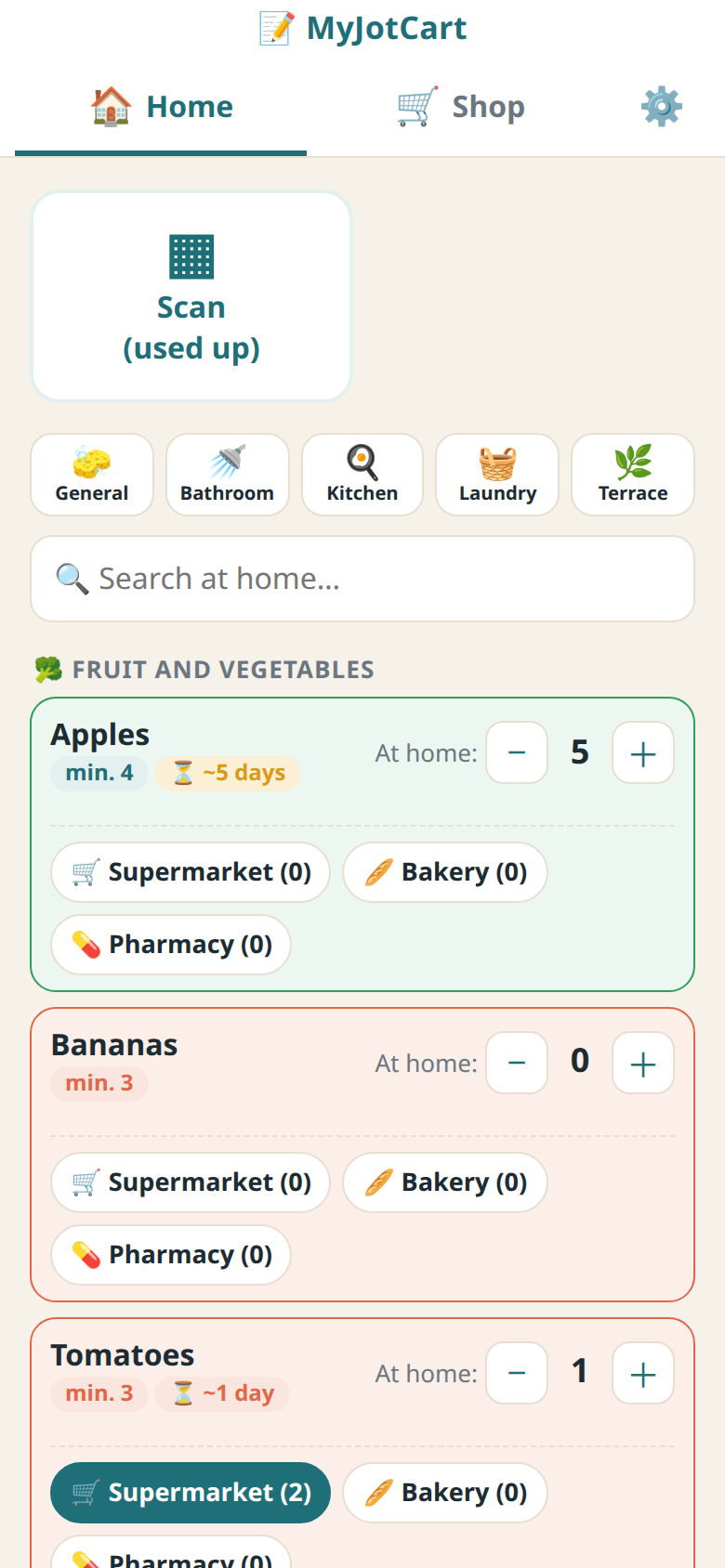
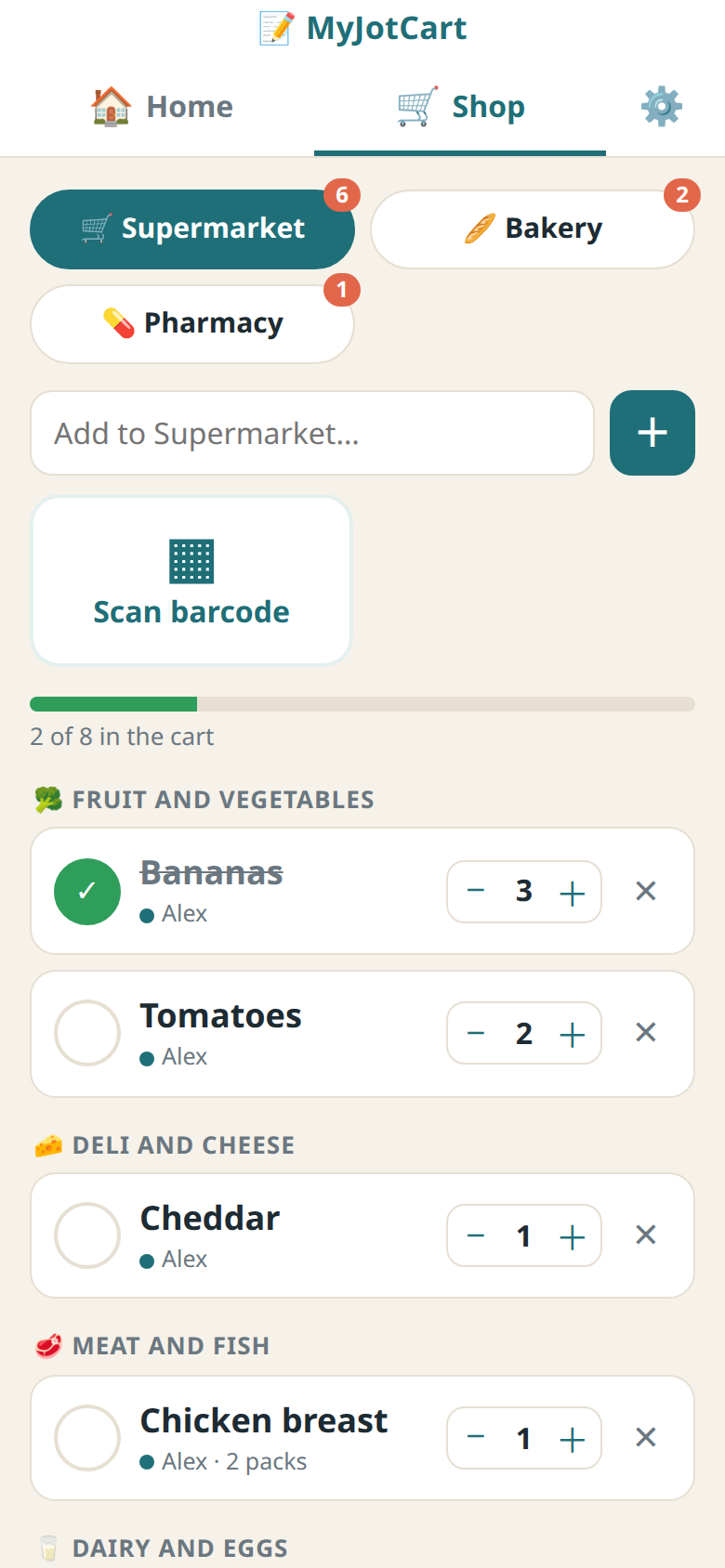
Free, and it stays freeGratis, y seguirá siéndolo
One list per storeUna lista por tienda
Everyone in the house adds from their phone and sees changes instantly. Items are grouped by aisle.Cada uno apunta desde su móvil y los cambios se ven al momento. Todo agrupado por pasillos.
Home pantryDespensa de casa
Set a minimum and how long things last. When something runs low, it goes onto its list by itself.Pon un mínimo y cuánto dura cada cosa. Cuando algo se acaba, se apunta solo en su lista.
Barcode scannerEscáner de códigos
Scan with the phone camera, or with a small ESP32 scanner in the kitchen when something is used up.Con la cámara del móvil o con un pequeño escáner ESP32 en la cocina cuando algo se gasta.
Voice and dashboardsVoz y paneles
"Add milk to my supermarket list" with Assist. Lists as to-do entities, sensors and a dashboard card.«Añade leche a la lista del súper» con Assist. Listas como tareas pendientes, sensores y tarjeta para el panel.
Your data stays homeTus datos se quedan en casa
Everything lives in your Home Assistant and is included in its backups. Works from outside through Home Assistant.Todo vive en tu Home Assistant y entra en sus copias de seguridad. Desde fuera, a través de Home Assistant.
Made for familiesPensada para familias
Each person has a name and a short PIN. Works for non-admin Home Assistant users too.Cada persona con su nombre y un PIN corto. También para usuarios de Home Assistant que no son administradores.
☕ MyJotCart Pro
Buy us a coffee and unlock the AI features in your home. One-time payment, no subscription.Invítanos a un café y se activan las funciones de IA en tu casa. Pago único, sin suscripción.
from Anthropic (Claude), OpenAI (ChatGPT) or Google (Gemini). Pro unlocks the features in MyJotCart; the AI itself is billed by that provider on your account (a few cents per receipt). No key, no AI.de Anthropic (Claude), OpenAI (ChatGPT) o Google (Gemini). Pro activa las funciones en MyJotCart; el uso de la IA lo cobra ese proveedor en tu cuenta (unos céntimos por ticket). Sin clave no hay IA.
Card, PayPal or crypto. Your key (MJC-XXXX-XXXX-XXXX) appears on screen and arrives by email.Tarjeta, PayPal o cripto. Tu clave (MJC-XXXX-XXXX-XXXX) aparece en pantalla y te llega por email.
Then in MyJotCart: Settings → Artificial intelligence → paste the key → Activate.Después, en MyJotCart: Ajustes → Inteligencia artificial → pega la clave → Activar.
What Pro unlocksQué activa Pro
- 📷 Photo → productFoto → productoTake a picture of something and it's recognised.Haz una foto y lo reconoce.
- 🧾 Read receipts and invoicesLeer tickets y facturasPhoto or PDF: adds to your pantry and keeps prices per store. The image isn't stored.Foto o PDF: suma a la despensa y guarda los precios por tienda. La imagen no se guarda.
- 🍳 Recipes: what's missingRecetas: qué faltaChecks what you have at home and adds the rest to your list.Mira qué tenéis en casa y apunta lo que falta.
- 🗂️ Smart aislesPasillos automáticosNew products go to the right aisle automatically.Los productos nuevos van solos a su pasillo.
Get a key: Anthropic · OpenAI · Google. Paste it in MyJotCart → Settings → Artificial intelligence. A ChatGPT Plus or Claude Pro subscription is not an API key.Consigue una clave: Anthropic · OpenAI · Google. Se pega en MyJotCart → Ajustes → Inteligencia artificial. Una suscripción a ChatGPT Plus o Claude Pro no es una clave de API.
InstallInstalación
Needs Home Assistant OS or Supervised (add-ons).Necesita Home Assistant OS o Supervised (complementos).
- Add-on (the app): Settings → Add-ons → Add-on store → ⋮ → Repositories → addComplemento (la app): Ajustes → Complementos → Tienda → ⋮ → Repositorios → añade
https://github.com/cleydar-creator/myjotcart-addon, install MyJotCart and start it. It appears in the sidebar., instala MyJotCart y arráncalo. Aparece en la barra lateral. - Integration (optional): HACS → ⋮ → Custom repositories →Integración (opcional): HACS → ⋮ → Repositorios personalizados →
https://github.com/cleydar-creator/myjotcart-ha, type Integration → install → restart. MyJotCart shows up under Discovered., tipo Integración → instalar → reiniciar. MyJotCart sale en «Descubiertos».
| Add-onComplemento | IntegrationIntegración | |
|---|---|---|
| What it isQué es | The app itself; keeps your dataLa app en sí; guarda tus datos | A connector to Home AssistantUn conector con Home Assistant |
| Where you see itDónde se ve | MyJotCart in the sidebarMyJotCart en la barra lateral | To-do lists + a dashboard cardTareas pendientes + tarjeta del panel |
| AddsAñade | Lists, pantry, scanner, settingsListas, despensa, escáner, ajustes | Voice (Assist), sensors, cardVoz (Assist), sensores, tarjeta |
| Needed?¿Hace falta? | YesSí | OptionalOpcional |
QuestionsPreguntas
I moved to a new Home Assistant. Can I keep Pro?He cambiado de Home Assistant. ¿Conservo Pro?
Yes. In the old one, Settings → Artificial intelligence → "Deactivate in this home", then activate the key in the new one.Sí. En el antiguo, Ajustes → Inteligencia artificial → «Desactivar en esta casa», y actívala en el nuevo.
Does Pro need internet?¿Pro necesita internet?
Only once, to activate the key. After that it's checked locally. The AI features themselves call your AI provider.Solo una vez, para activar la clave. Después se comprueba en local. Las funciones de IA sí llaman a tu proveedor de IA.
I lost my keyHe perdido mi clave
It's in the order confirmation email from sell.app, and in your order there. Still can't find it? Write to us.Está en el email de confirmación del pedido de sell.app y en el propio pedido. ¿No la encuentras? Escríbenos.
Help & contactAyuda y contacto
A problem or an ideaUn problema o una idea
Open an issue on GitHub: tell us your MyJotCart version (Settings → Add-ons), what you did and what you saw. It's public, so never paste keys.Abre una incidencia en GitHub: dinos tu versión de MyJotCart (Ajustes → Complementos), qué hiciste y qué viste. Es público, así que nunca pegues claves.
Your purchase or your keyTu compra o tu clave
Key not arriving, "already active in another home", refunds… Write to us privately and include your sell.app order ID.La clave no llega, «ya activada en otra casa», devoluciones… Escríbenos en privado e incluye el número de pedido de sell.app.